Updated October 5, 2026
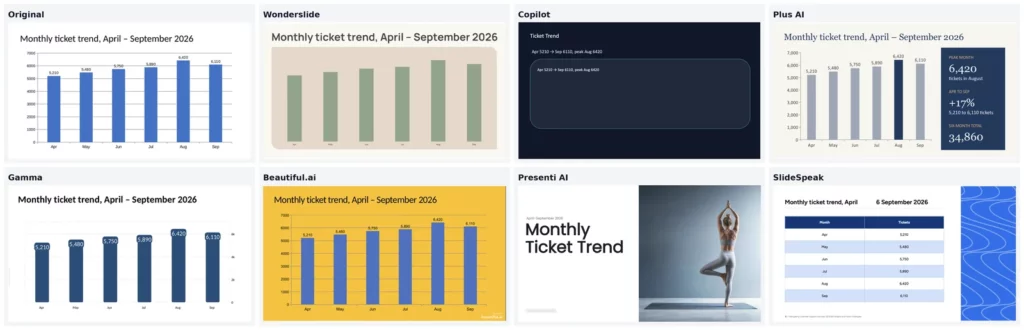
We ran the same 12-slide quarterly report through seven AI redesign tools on September 30, 2026. Wonderslide, Beautiful.ai and SlideSpeak kept 98% of our text, Plus AI kept 97%, and Copilot rewrote the deck down to about 22%. Charts were the weak spot: Copilot and Presenti AI removed ours, and SlideSpeak turned it into a table. Wonderslide (our product) is the only tool that sells a single editable PPTX without a subscription, for $4.99.
Yes, AI can redesign a PowerPoint you already have. Five of the seven tools we tested take an uploaded file: Wonderslide, Gamma, Beautiful.ai, Presenti AI and SlideSpeak. Copilot and Plus AI work on the deck you have open in PowerPoint or Google Slides.
What you get back differs. Copilot and Plus AI return a native PPTX. Wonderslide returns a PDF on the free plan and an editable PPTX on paid plans. Gamma exports to PDF, PowerPoint, Google Slides and PNG. Beautiful.ai exports to PDF and PowerPoint. Presenti AI returns PPTX, PDF, PNG or JPG. SlideSpeak lets you download the result only with a paid subscription.
Lots of people make slides with AI. According to a Gallup Workplace survey (July 2026), 17% of U.S. employees who use AI at work use it for presentations. We only tested tools that redesign decks you already have. On September 30, 2026, we ran the same 12-slide quarterly report through every tool and scored each one on eight criteria.
Key takeaways
- Most tools kept nearly all of your text. Wonderslide, Beautiful.ai and SlideSpeak kept 98%, and Plus AI kept 97%. Presenti AI kept 90% on the control slides. Gamma kept about 90% of the deck, because its free plan redesigns only 10 of 12 slides. Copilot kept only about 22%: it rewrote the deck into short summaries.
- Text also changed outside the control slides. SlideSpeak changed the deck title in the footer and garbled the chart slide title. Plus AI added a callout with calculated metrics.
- The tools rebuilt our slides to very different degrees. Gamma mostly changed fonts and colors on the original layouts. Wonderslide built new layouts from designer templates. Beautiful.ai imported everything, but without a paid plan you redesign by hand. Presenti AI let images overflow the slide edges.
- In our test, every tool finished a deck within about two minutes. Plus AI took 17 seconds, Wonderslide about 2 minutes; 3.6 minutes median across 856 users according to Wonderslide usage data from September 2026.
- Only Wonderslide has a per-deck price. It sells a single editable PPTX for $4.99 without a subscription. None of the other six tools has a pay-per-deck option.
What “redesign” means: restyle vs rebuild vs rewrite
A PowerPoint redesign usually falls into one of three categories.
Restyle: new design, your words untouched
A restyle changes fonts, colors and visual hierarchy. Your text and layout stay as they were. Gamma did a light restyle in our test.
Rebuild: new layout and structure, content moved or split
A rebuild changes the structure of your slides. Content moves into new cards, columns or visual blocks. Wonderslide turned bullet points into infographics. SlideSpeak turned our native chart into a table.
Rewrite: the AI changes your text
A rewrite happens when the AI changes titles, shortens phrases or summarizes content. Copilot rewrote our deck: it condensed paragraphs into short summaries and kept about 22% of the words. Check every slide after a redesign.
How we tested
Wonderslide is our product. We ran it through the same deck, the same stopwatch and the same word count as the other six.
We tested all seven tools on September 30, 2026, with the same 12-slide deck.
The test deck: 12 slides, 2 tables, 1 chart, 3 photos
The test file was a quarterly support report with a text-heavy slide, bullet lists, two data tables, one native chart and three images.
8 criteria we scored
- Does it accept an existing PPTX or PDF, or work on an open deck?
- How much text does it keep word for word?
- What do you get back: PPTX, PDF or images?
- What happens to charts, tables and photos?
- How long does it take?
- What does the free plan include?
- Is there a per-deck price, or only a subscription?
- Is there a watermark on free output?
Measuring text preservation
We compared the words on three control slides with the original: a paragraph, a long bullet list and a short bullet list. For Wonderslide and Gamma, we also checked every word in the deck (529 words). We timed every tool with a stopwatch, the same way for all seven.
AI PowerPoint redesign tools compared: results table
All tests were performed on September 30, 2026, using official pricing pages.
| Tool | Accepts existing PPTX/PDF | Text kept verbatim (control slides; full deck where noted) | What you get back | Images, tables, charts | Time to result | Free plan and limits | Price per deck / subscription | Watermark on free output |
|---|---|---|---|---|---|---|---|---|
| Wonderslide | Yes: PPTX, PDF, DOCX, text | 98% on full deck. Two bullet slides came back as non-editable graphic cards. | PDF on the free plan; editable PPTX on paid options | Charts and tables stayed editable; weak photos were replaced with stock photos | About 2 minutes | 3 PDF decks/month, up to 10 slides | Single $4.99 · Pack of 5 $14.99 · Week Pass $7.99 · subscriptions from $12.99/mo | None |
| Microsoft Copilot in PowerPoint (Designer) | Edits the open PPTX via slide-by-slide Design Suggestions or chat-based Agent Mode | About 22% on control slides; detailed content was condensed into short summaries | Native PPTX | Tables and the chart were removed; the slide 5 chart was replaced by a single line of text | About 50 seconds | Basic Designer suggestions are free on the web; Copilot requires Microsoft 365 | Microsoft 365 Personal $9.99/mo, 60 AI credits | None |
| Plus AI | Edits open decks in PowerPoint and Google Slides; up to 30 slides per batch | 97% on control slides in Strict mode | Native PPTX or Google Slides | Added a summary callout with calculated metrics next to the chart | About 17 seconds | 7-day trial; card required | Basic $10/mo billed annually, $15 monthly | Yes (trial output) |
| Gamma | Yes: PPTX, PDF, DOCX | About 90% on full deck (477 of 529 words); the free plan redesigns only 10 of 12 slides | PDF, PPTX, Google Slides, PNG | Charts, tables and photos stayed in their original positions; a lighter restyle than a full rebuild | About 1.5 minutes | 400 credits; up to 10 slides per redesign; watermark | Plus about $8/mo billed annually, about $10 monthly | Yes (“Made with Gamma”) |
| Beautiful.ai | Yes: imports PPTX | 98% on control slides | PDF and PowerPoint | All content was imported; without a paid plan, you redesign by hand | About 5 seconds to import; redesign is manual without a paid plan | 14-day trial; card required | Pro $14.50/mo billed annually, $45 monthly | Yes (trial output) |
| Presenti AI | Yes: PPTX, PDF | 90% on control slides | PPTX, PDF, PNG, JPG | Images overflowed the slide edges; tables and the chart were removed | About 36 seconds | Free tier with limited AI credits | $6 to $16/mo billed annually (promo prices as of September 30, 2026) | Yes |
| SlideSpeak | Yes: PPTX, PDF, Word, Excel | 98% on control slides; the footer text was changed and a header character was garbled | PPTX and PDF; download requires a paid plan | Turned the chart into a table; added its own footer text | About 40 seconds | 3 web previews/month | Premium $29/mo or $290/year | n/a (no free export) |
The 7 tools, tested one by one
Wonderslide
Wonderslide kept 98% of our text, built new layouts from designer templates, and sells a single editable PPTX without a subscription.
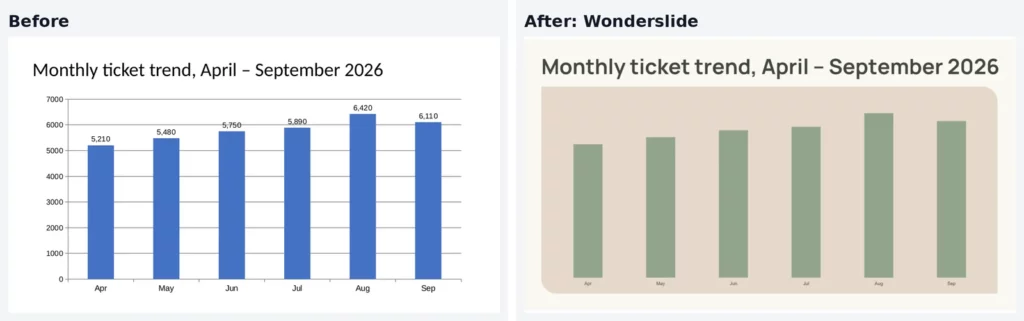
Wonderslide kept the chart editable with all six values but removed the value labels.
- Input/Output: Accepts PPTX, PDF, DOCX and text. You get a PDF on the free plan and an editable PPTX on paid options.
- Text & Media Handling: 98% of the text kept. Two bullet slides came back as non-editable graphic cards. Charts and tables stayed editable. Weak photos were replaced with stock photos.
- Time: About 2 minutes.
- Pricing: The free plan gives you 3 PDF decks a month, up to 10 slides each. Single deck $4.99, Pack of 5 $14.99, Week Pass $7.99, subscriptions from $12.99/mo.
- Best for: One-off redesigns when you need an editable PPTX without a subscription.
Microsoft Copilot in PowerPoint (Designer)
Copilot operates natively within Microsoft PowerPoint, making it convenient for existing M365 users.

Copilot replaced our chart with a single line of text.
- Input/Output: Edits the open PPTX via Design Suggestions for each slide or chat-based Agent Mode. Returns a native PPTX.
- Text & Media Handling: Copilot rewrote the content instead of restyling it. It kept about 22% of the text (about 115 of 529 words) and condensed paragraphs into short summaries. Tables and the chart were removed. The slide 5 chart was replaced by a single line of text.
- Time: About 50 seconds.
- Pricing: Requires Microsoft 365 Personal at $9.99/mo with 60 AI credits. Basic Designer suggestions are free on the web.
- Best for: Microsoft 365 subscribers who are fine with Copilot rewriting their text.
Plus AI
Plus AI functions as an add-in for PowerPoint and Google Slides, providing controlled slide transformations.
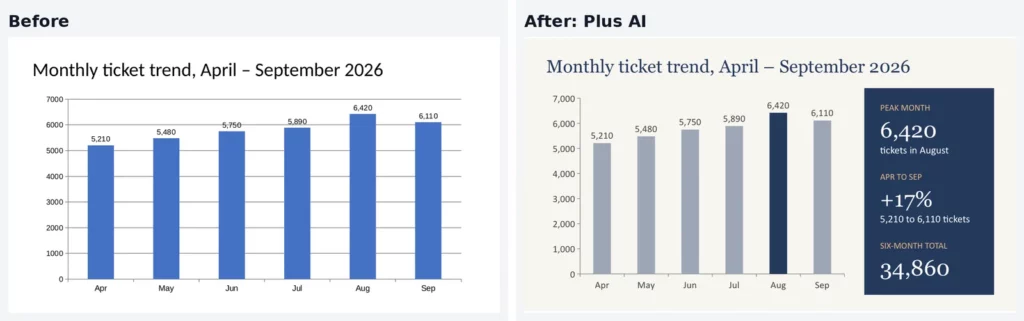
Plus AI added a callout with three calculated figures next to the chart.
- Input/Output: Edits open decks, up to 30 slides per batch. Returns a native PPTX or Google Slides deck.
- Text & Media Handling: 97% of the text kept in Strict mode. It added a summary callout with calculated metrics next to our chart.
- Time: About 17 seconds.
- Pricing: 7-day trial, card required. Basic costs $10/mo billed annually ($15 monthly).
- Best for: People who want to work inside PowerPoint or Google Slides.
Gamma
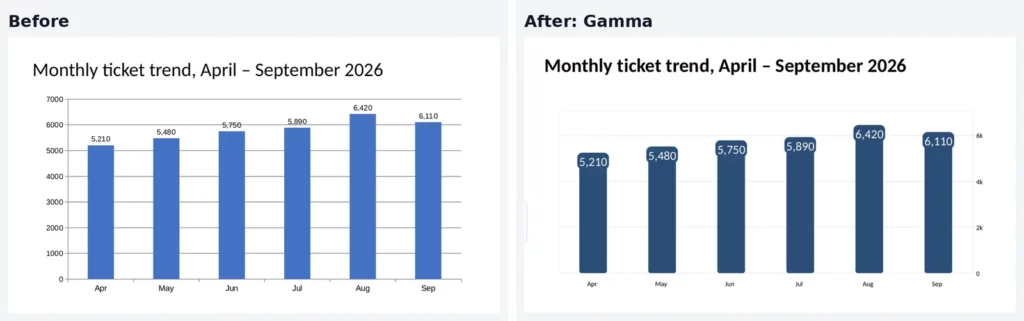
Gamma imported our file cleanly but did a light restyle instead of rebuilding the layouts. On the free plan, it redesigns only 10 slides.
- Input/Output: Accepts PPTX, PDF and DOCX. Exports to PDF, PPTX, Google Slides and PNG.
- Text & Media Handling: About 90% of the deck’s text kept (477 of 529 words). The free plan redesigns only the first 10 of our 12 slides. Charts, tables and photos stayed in their original positions.
- Time: About 1.5 minutes.
- Pricing: The free plan includes 400 credits, up to 10 slides per redesign, with a watermark. Plus costs about $8/mo billed annually (about $10 monthly).
- Best for: Web-first presentations you share via link. See our list of Gamma alternatives.
Beautiful.ai
Beautiful.ai imported all deck content, but automated smart layout rebuilding requires a paid tier.
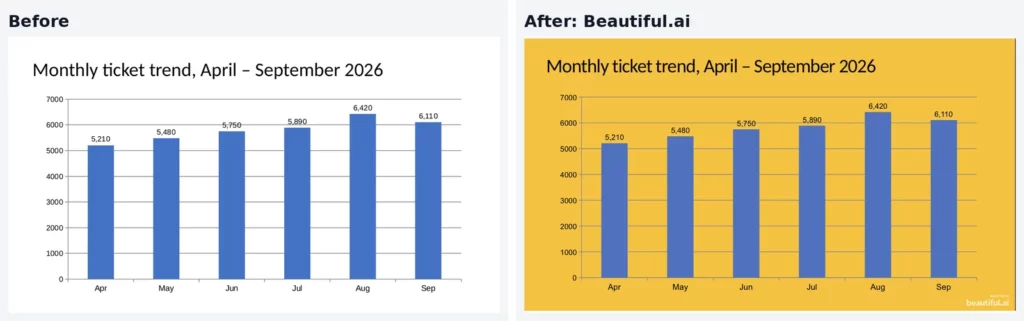
Beautiful.ai imported the chart as is; the redesign is up to you.
- Input/Output: Imports PPTX. Exports to PDF and PowerPoint.
- Text & Media Handling: 98% of the text kept. Without a paid plan, you adjust layouts manually.
- Time: About 5 seconds to import. The redesign itself is manual without a paid plan.
- Pricing: 14-day trial, card required. Pro costs $14.50/mo billed annually or $45 billed monthly.
- Best for: Teams ready to adopt Beautiful.ai’s template system for future decks.
Presenti AI
Presenti AI offered quick processing but exhibited layout rendering issues with image placement.
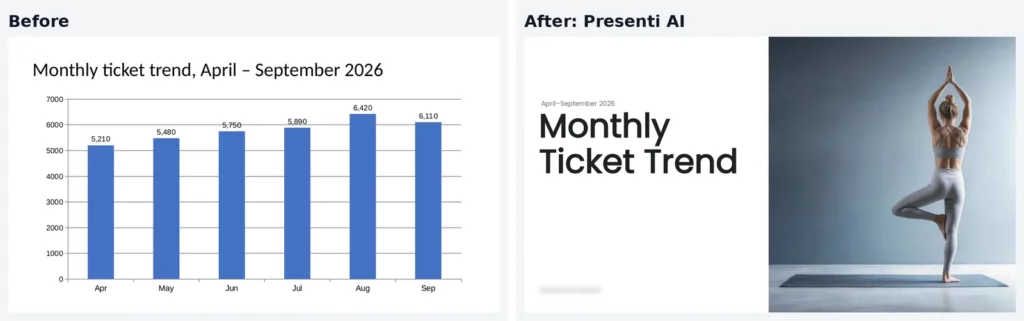
Presenti AI dropped our chart and added an unrelated stock photo.
- Input/Output: Accepts PPTX and PDF. Exports PPTX, PDF, PNG and JPG.
- Text & Media Handling: 90% of the text kept on the control slides. Images overflowed the slide edges, so you have to move them back. Tables and the chart were removed.
- Time: About 36 seconds.
- Pricing: Free tier with limited credits. Paid tiers cost $6 to $16/mo billed annually (promo prices as of September 30, 2026).
- Best for: Tight budgets, if you don’t mind fixing image placement after export.
SlideSpeak
SlideSpeak redesigned our deck but altered footer text, converted charts to tables, and locked downloads behind a subscription.
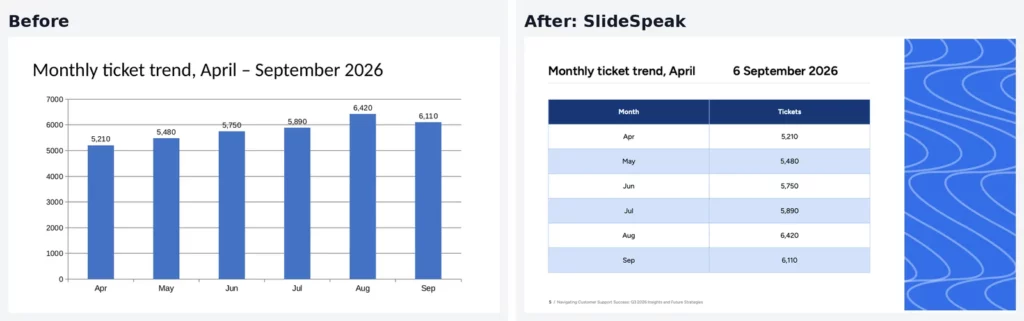
SlideSpeak turned the chart into a table and garbled the slide title.
- Input/Output: Accepts PPTX, PDF, Word and Excel. Downloading requires a paid plan.
- Text & Media Handling: 98% of the text kept on the control slides. It added its own footer text and garbled a character in a header. It turned the chart into a table.
- Time: About 40 seconds.
- Pricing: The free account allows 3 web previews a month. Premium costs $29/mo or $290/year.
- Best for: People who already pay for SlideSpeak Premium.
How to redesign an existing deck with AI and keep your content
The workflow below demonstrates how to transform a deck using Wonderslide. For complete details on optimized workflows, visit our dedicated PPTX redesign page.
Step 1. Audit your source deck. Open your original file. Note special fonts, speaker notes, and hidden slides so you can verify them after export.
Step 2. Convert standalone PDF files. If your source is in PDF format, convert it using our free PDF to PPT converter (supports files up to 50 MB). To review converter tools, see our test of PDF to PPT converters.
Step 3. Upload the file. Upload your PPTX, PDF, or DOCX document.
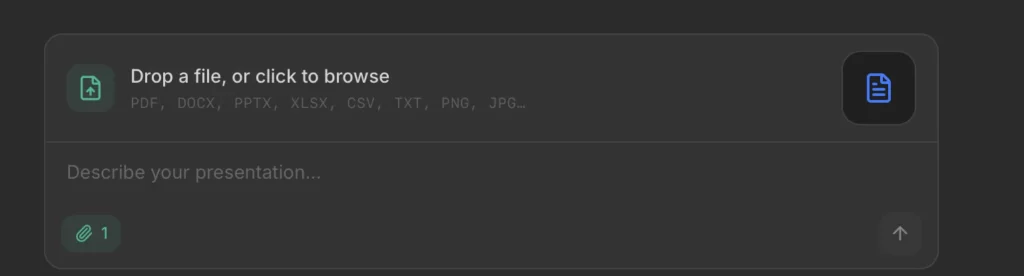
Step 4. Select a visual theme. Choose a design style prior to generation to apply consistent styling across all slides.
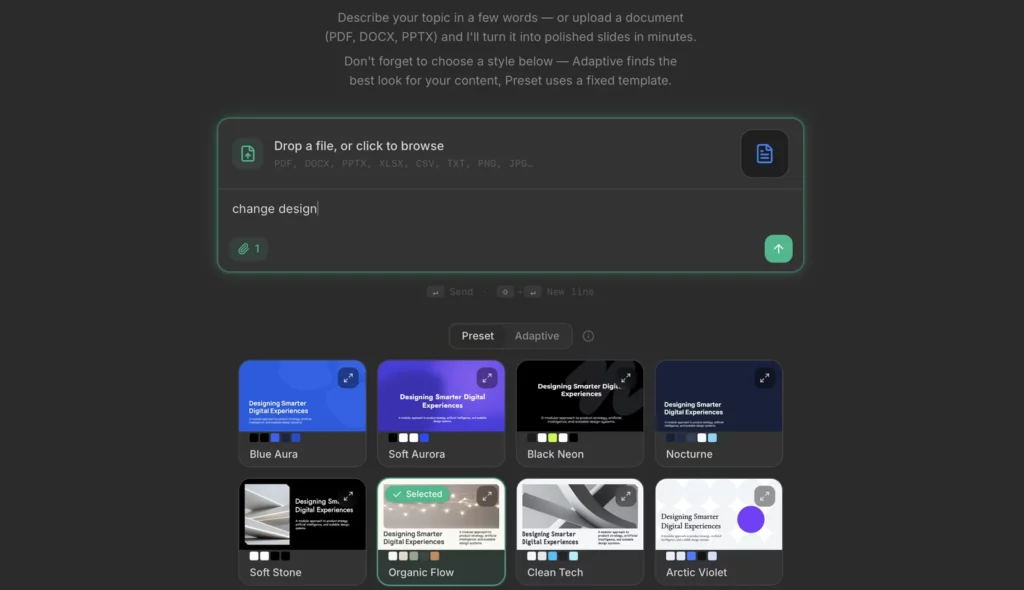
Step 5. Generate the presentation. Wonderslide’s September 2026 performance metrics show a 3.6-minute median generation time and 5.5 minutes total from user registration to finished presentation (n=856).

Step 6. Verify text and data elements. Review every slide. Compare tables, charts, and text blocks against the original file to ensure accuracy.
Step 7. Regenerate alternative styles if needed. If you want to test different aesthetics, generate a new version in another template without overwriting previous outputs.
Step 8. Export to PPTX. Download your file. Free accounts export to PDF, while paid passes ($4.99 single deck option) provide editable PPTX files for final adjustments in PowerPoint.
When AI redesign is the wrong tool
AI redesign works well for standard slides, but it has limits.
Complex diagrams and process schemes
AI tools can misread custom process flows and schematics. In our test, Copilot removed our tables and chart, and SlideSpeak turned the chart into a table. If your deck depends on detailed diagrams, check every one after the redesign.
Strict brand guidelines or a mandatory corporate template
AI tools apply their own style systems, not your brand book. A mandatory corporate template usually needs manual setup or a team plan.
Large decks with animations and transitions
Big decks can hit slide limits. Plus AI handles 30 slides per batch, the Wonderslide free plan takes up to 10 slides, and Gamma’s free plan redesigns 10. Custom transitions and animations are usually lost.
Best AI for PowerPoint redesign: which one to pick
You need an editable PPTX of one deck without a subscription
Wonderslide. It kept 98% of our text and sells a single editable PPTX for $4.99.
You already pay for Microsoft 365
Copilot works on the deck you have open in PowerPoint. Expect it to rewrite your text.
You work in PowerPoint or Google Slides all day
Plus AI remixes slides inside your editor.
You present from a browser link
Gamma shares decks as web links and exports standard files. The free plan redesigns only 10 slides.
Your source is only a PDF
Wonderslide, Gamma and SlideSpeak accept PDF files. You can also convert the PDF with our free PDF to PPT converter first.
FAQ
Is there an AI that can take my existing PowerPoint and make it look better?
Yes. All seven tools we tested work with existing presentations and apply new layouts, colors and fonts.
Which AI tools let me upload a PPTX instead of starting from scratch?
Wonderslide, Gamma, Beautiful.ai, Presenti AI and SlideSpeak accept PPTX uploads. Copilot and Plus AI edit open files in PowerPoint or Google Slides.
Will the AI rewrite my text?
Often, yes. No tool kept our text 100% intact. Copilot rewrote most of our deck into short summaries, and Plus AI added a callout with calculated figures. Check every slide.
Can I get an editable PPTX back, not just a PDF or images?
Yes. Beautiful.ai, Copilot, Plus AI, Gamma, Presenti AI and Wonderslide (paid options) export editable PPTX files. SlideSpeak requires a subscription to download.
How long does an AI redesign take?
In our test, between 17 seconds (Plus AI) and about 2 minutes (Wonderslide). Beautiful.ai imported our deck in 5 seconds, but without a paid plan you redesign by hand.
Do I need a subscription for one deck?
Not with Wonderslide. It sells a single editable PPTX for $4.99 and a Week Pass for $7.99. None of the other six sells a single deck.
Does Copilot redesign existing slides or only new ones?
It works on existing slides. Copilot changes the PPTX you have open through Design Suggestions or chat prompts.
What happens to my charts and images?
It depends on the tool. Wonderslide kept charts and tables editable and replaced weak photos with stock photos. SlideSpeak turned our chart into a table. Copilot and Presenti AI removed our tables and chart, and Presenti AI let images overflow the slide edges.
Methodology
We tested on September 30, 2026, with the same 12-slide PPTX. We ran each tool on its free plan or free trial, the way you would try it before paying. Wonderslide is the exception: its free plan stops at 10 slides and a PDF, and it sells a single editable PPTX for $4.99 without a subscription. That option is made for one-off decks, so we bought it to see what you actually get for $4.99. We measured how many words each tool kept on three control slides. For Gamma and Wonderslide, we also checked every word in the deck. Gamma’s free plan redesigns only 10 slides, so its count covers 10 of 12 slides. We timed every tool with a stopwatch, the same way for all seven. Wonderslide’s median generation time comes from internal analytics (September 2026, n=856). We left out Perceptis AI because access is by application only.
We checked features and prices on official pages:
- Microsoft Copilot Designer
- Microsoft 365 Pricing
- Plus AI Pricing and Remix documentation
- Gamma Pricing and Import Guide
- Beautiful.ai Pricing and PowerPoint import
- Presenti AI Pricing
- SlideSpeak Pricing
- Wonderslide Pricing
Try it on your own deck
Upload your PPTX, PDF or DOCX and get a redesigned presentation in a few minutes.