Updated 2026-10-14.
We tested seven AI infographic generators on October 14, 2026, with one timeline brief in two sizes: 10 and 18 events. At 10 events, five tools wrote every line correctly. At 18 events, three did: Wonderslide, Gamma and Napkin AI. ChatGPT dropped two events, Gemini drew events twice, and Piktochart’s text was unreadable.
Wonderslide runs this test and is one of the tools in it; see "How we tested".
Key takeaways
- 3 of 7 tools wrote all 18 lines without an error: Wonderslide, Gamma and Napkin AI. Each one changed the layout in some way: period labels, words split mid-word, or added headings.
- Image chatbots are fine at 10 events and slip at 18. ChatGPT left out 2 of 18 events. Gemini drew 4 of 10 events twice and misspelled one line at 18.
- Canva got 3 of 28 lines wrong, including "First 1st production fine opdion line opened" instead of "First production line opened".
- Piktochart’s 18-event image had 0 readable lines and invented years such as 2038.
- Free plans set the limits. Gamma and Napkin brand free exports; Piktochart allows 2 PNG downloads per account.
Test results: 7 AI infographic generators compared
| Tool | Correct lines, 10 events | Correct lines, 18 events | Extra or missing content | Edit text in place | Free export we got | Watermark on free | Paid from |
|---|---|---|---|---|---|---|---|
| Wonderslide | 10 of 10 | 18 of 18 | 5 period labels added at 18 events | No, regenerate through chat | PPTX on paid access; PDF on Free | No | $12.99/month or $4.99 for one deck |
| Gamma | 10 of 10 | 18 of 18 | Words split mid-word at 18 events | Yes | PDF, PPTX, PNG | Gamma badge | Plus €10/month (EU price) |
| Napkin AI | 10 of 10 | 18 of 18 | Own headline added to each of 10 events; 3 group headings at 18 | Yes | PNG, PDF, SVG, PPTX | Napkin logo | $12/month, $9 billed yearly |
| ChatGPT | 10 of 10 | 16 of 18 | 2 events missing at 18 | No, it is an image | PNG | None seen | Plus $20/month |
| Gemini | 10 of 10 | 17 of 18 | 4 events drawn twice at 10, 2 at 18 | No, it is an image | PNG | None seen | AI Plus $4.99/month |
| Canva | 8 of 10 | 17 of 18 | Block numbers 01 to 18 added | Yes | PNG, JPG, PDF, GIF, MP4, PPTX | None seen | Pro $18/month or $144/year |
| Piktochart | 9 of 10 | 0 of 18 | No readable text and invented years at 18 | No, it is an image | PNG, 2 downloads per account | None | Pro $15/month, $10 billed yearly |
How we tested
Every tool got the same English brief. It asks for a horizontal timeline titled "Kelvorix Dynamics: Company Timeline" with exactly 10 or exactly 18 events, "each written exactly as given, word for word". Kelvorix Dynamics is a fictional robotics company from our study of 29 image models on small text. Each event is one short line, such as "2010: First K-1 manipulator prototype built".
We kept each tool’s first result unedited, on free accounts and default settings. One exception: Piktochart’s 10-event run used Imagen 3, which we picked; its 18-event run used the default model.
A text recognizer read every image. Lines it could not confirm, 45 of 196, went to a person who checked them against the image. The rules:
- letter case, spaces and line breaks don’t count;
- any extra, missing or wrong character, a paraphrase or a wrong year is an error;
- an event drawn twice, or text the tool added on its own, is listed separately and doesn’t make a correct line wrong.
Every line and its verdict is in the results file (CSV), and both prompts are in the brief file (TXT), so you can repeat the test.
Disclosure: Wonderslide is our product. We ran it from an author account with paid access, because the free plan downloads PDF only. Its infographic mode draws with GPT Image 2 at the medium tier, which had all 71 of 71 lines accepted by a person in our model study.
Wonderslide
Wonderslide built a one-slide presentation in about 2 minutes, with all 28 lines correct. At 18 events it grouped the timeline into five periods and added labels such as "2009 – 2012 Foundations", which the brief did not ask for.
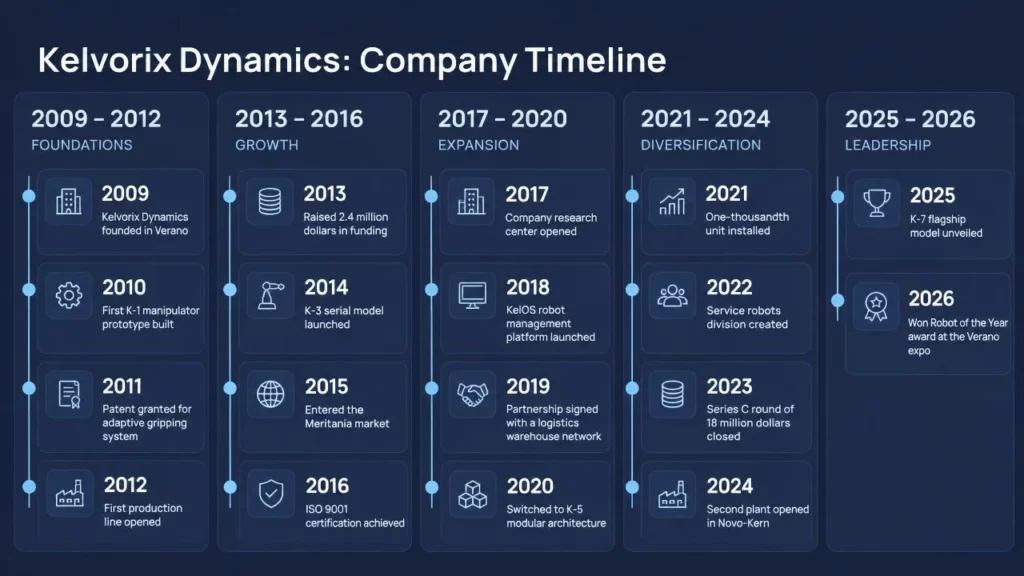
Wonderslide, 18 events: every line correct, plus five period labels.
The minus: the infographic is generated as one 1280×720 image, so its text can’t be edited in place. To change a word, you ask in chat and the infographic is generated again.
Wonderslide builds infographics from your data inside a full presentation. The Free plan gives 3 presentations a month, up to 10 slides each, with PDF download. Editable PPTX comes with paid plans: Starter is $12.99 a month, or one presentation costs $4.99 without a subscription. Prices vary by region; see pricing.
Gamma
Gamma says its AI infographics feature "is only available for Pro users" (checked October 7, 2026), so on Free we generated one regular card.
Gamma drew the timeline from real text boxes: 28 of 28 lines correct and editable. At 18 events the boxes got too narrow and words broke without a hyphen: "manipul ator", "launche d". That card also exported to PPTX as one picture.
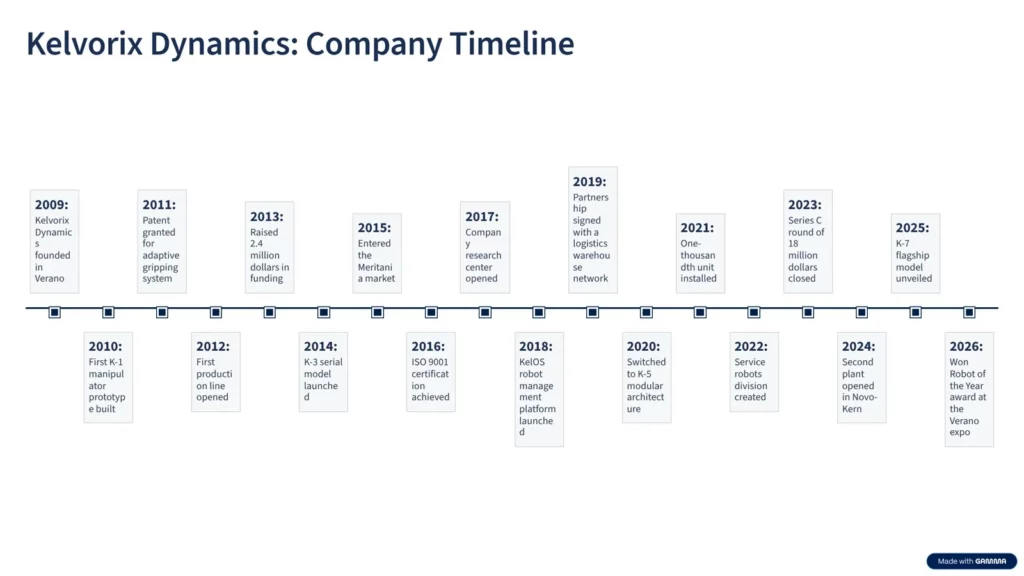
Gamma, 18 events: all lines correct.
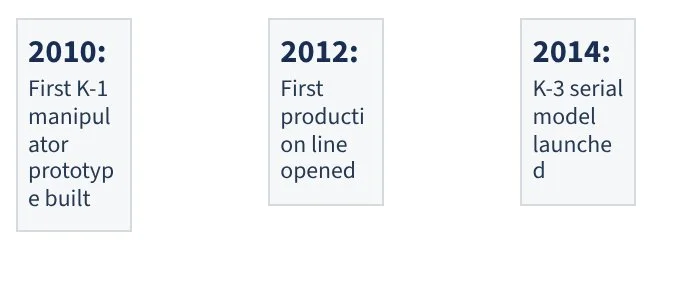
Close-up: words broken without a hyphen.
Free exports carry a Gamma badge, which paid plans remove. Gamma showed us prices in euros only: Plus is €10 a month and Pro, the plan with AI infographics, is €24 a month (€8 and €18 billed yearly, as shown to EU visitors on October 14, 2026).
Napkin AI
Napkin turns pasted text into a visual. All 28 lines were correct, but at 10 events Napkin put its own headline above each, such as "2010: First prototype built" above "2010: First K-1 manipulator prototype built". At 18 events it split the list into three phases with headings like "Founding and Early Development".
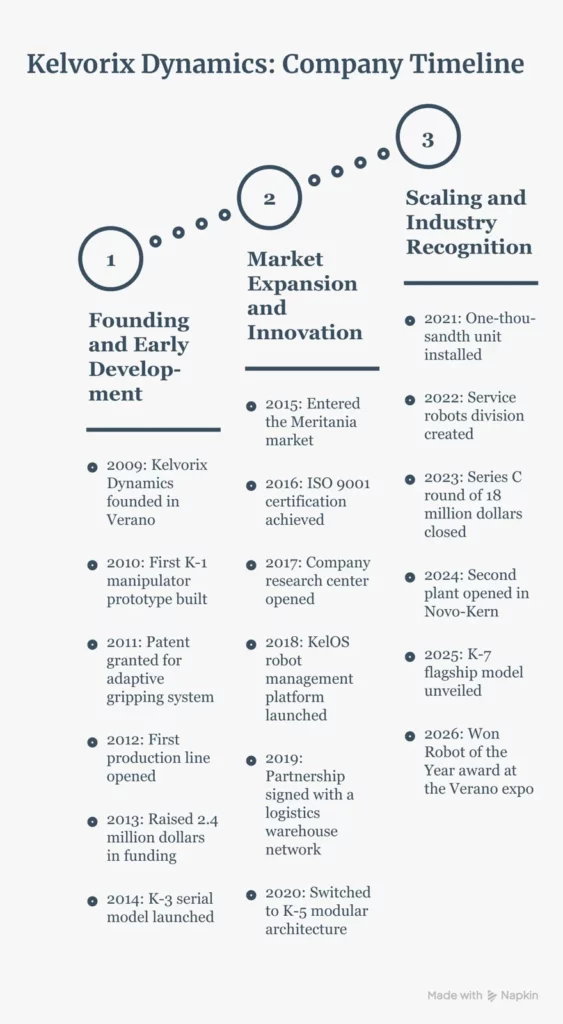
Napkin AI, 18 events: all lines correct, three phase headings added.
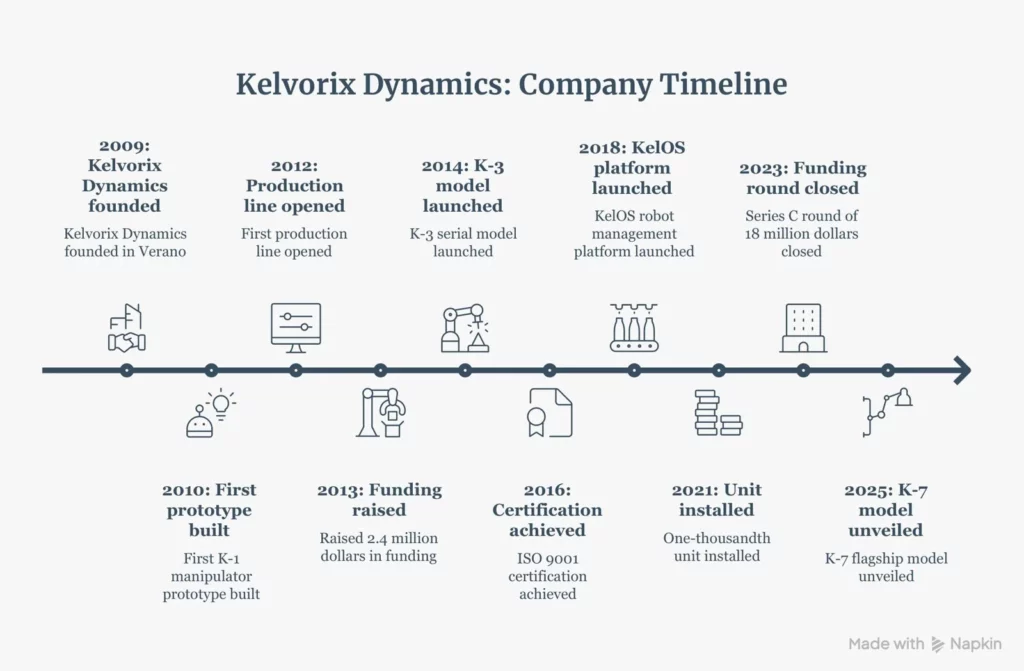
Napkin AI, 10 events: the bold headlines are Napkin’s own; the lines below them are ours.
Text is editable. Free accounts get 500 AI credits a week, and exports always carry a small Napkin logo, according to its help center. The free PNG is small: 726×476 pixels for the 10-event visual, so download the PDF if you need print size.
Napkin’s pricing page lists PPT and SVG export under Plus, yet our new free account exported both on October 14. Plus costs $12 a month, or $9 a month billed yearly.
ChatGPT
On a free account, ChatGPT returned a wide PNG, 2172×724 pixels. The 10-event image was clean. At 18 events it drew 16: 2015 and 2023 were missing. The rest were spelled correctly, but years alternate above and below the axis, so the reading order jumps.
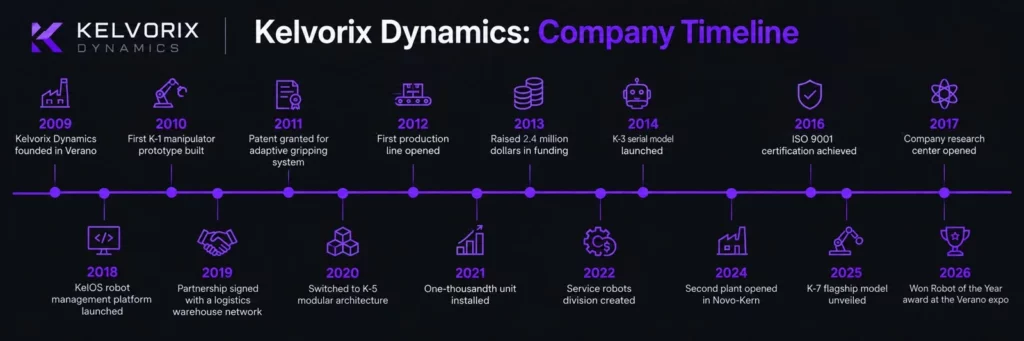
ChatGPT, 18 events: 16 drawn, 2015 and 2023 missing.
The text is part of the image. To fix it, you select an area and describe the change, and OpenAI warns that "edits may extend beyond the area you selected". Image generation is available on the free plan with a limit OpenAI doesn’t publish. Plus costs $20 a month.
Gemini
Free Gemini generates images with Nano Banana 2. Google offers Nano Banana Pro for "images that use text rendering or for infographics" only with a paid Google AI plan (checked October 7, 2026). Free downloads are 1K: our images were 1376×768 pixels.
At 10 events every line was spelled correctly, but the image had 14 blocks for 10 events. 2010, 2012, 2021 and 2025 each appeared twice, once above the axis and once below. At 18 events Gemini wrote "Paterranted for adaptive gripping system" instead of "Patent granted for adaptive gripping system", drew 2010 and 2024 twice and added numbers 1 to 18.
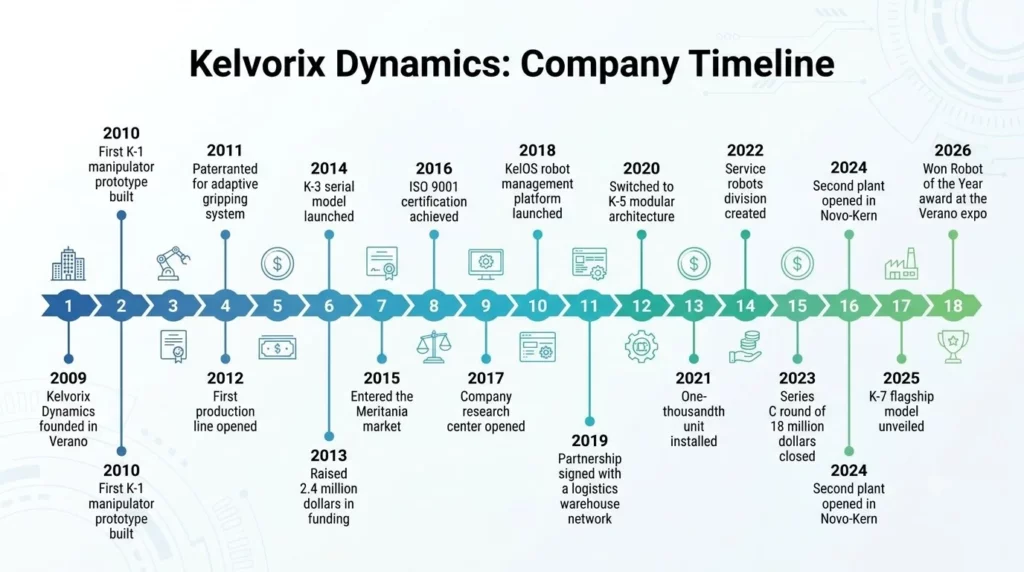
Gemini, 18 events: 2010 and 2024 appear twice, numbers 1 to 18 added.
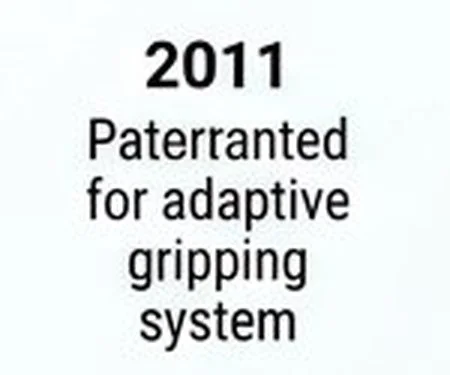
Close-up: "Paterranted" for "Patent granted".
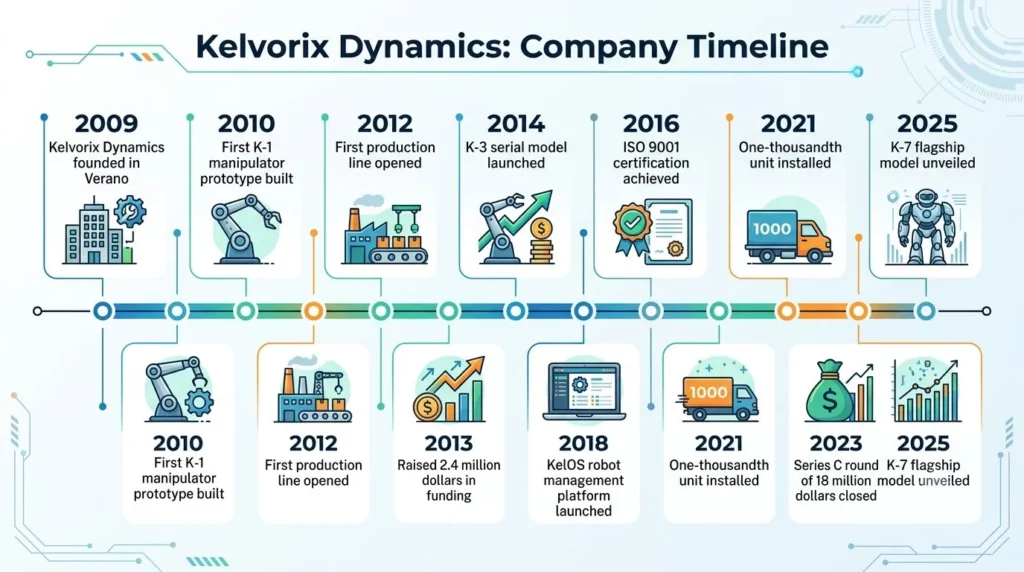
Gemini, 10 events: 2010, 2012, 2021 and 2025 appear twice. Google AI Plus costs $4.99 a month.
Canva
Canva produced an editable design on the free plan and got 25 of 28 lines right. The 10-event version read "First 1st production fine opdion line opened" and put a stray semicolon after "dollars". The 18-event version wrote "One-thousandh unit installed".
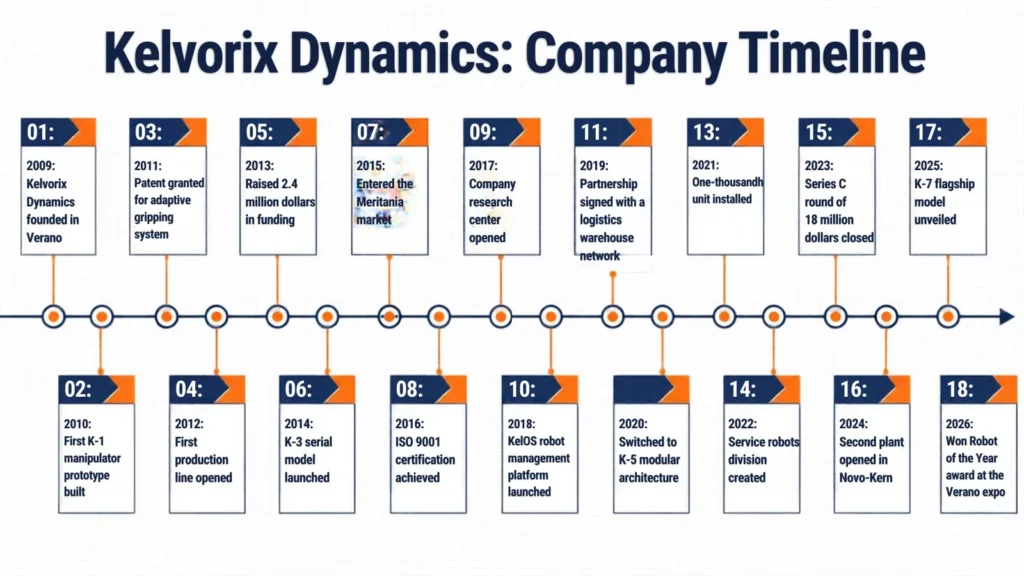
Canva, 18 events: 17 of 18 lines correct.
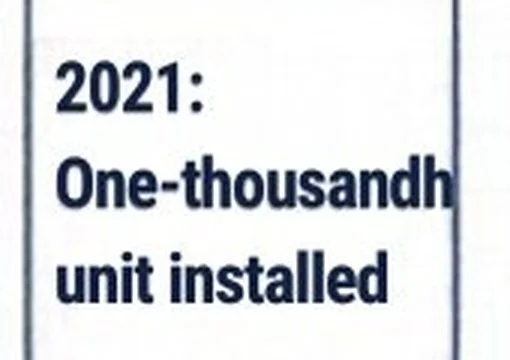
Close-up, 18 events: "One-thousandh".
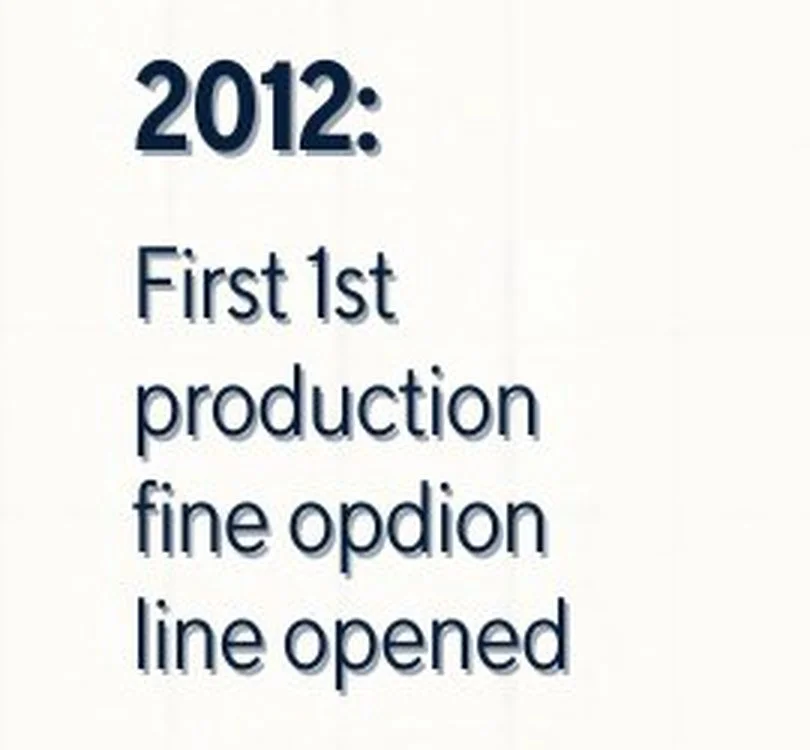
Close-up, 10 events: the brief said "First production line opened".
Each error is a quick fix once you find it, but the same errors sit in the exported PDF and PPTX, so proofread before you export.
The free plan let us download PNG, JPG, PDF, GIF, MP4 and PPTX, with SVG locked. We saw no watermark. Canva Pro costs $18 a month or $144 a year.
Piktochart
Piktochart’s AI generator lets you pick among several image models. Our 10-event run used Imagen 3 and got 9 of 10 lines right: the 2023 funding round was labeled 2025. The 18-event run used the default model and produced no readable line at all, with invented years such as 2038 on the axis.
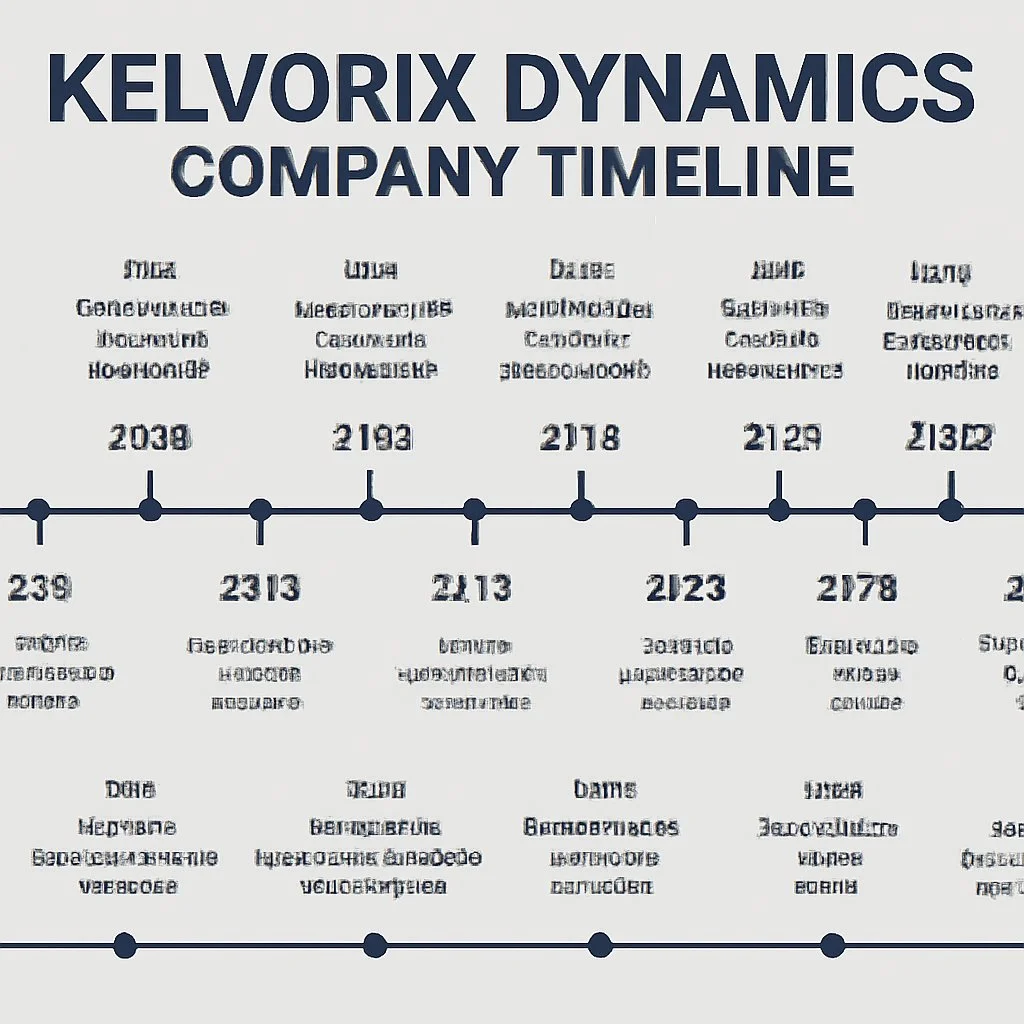
Piktochart, 18 events: no readable line.
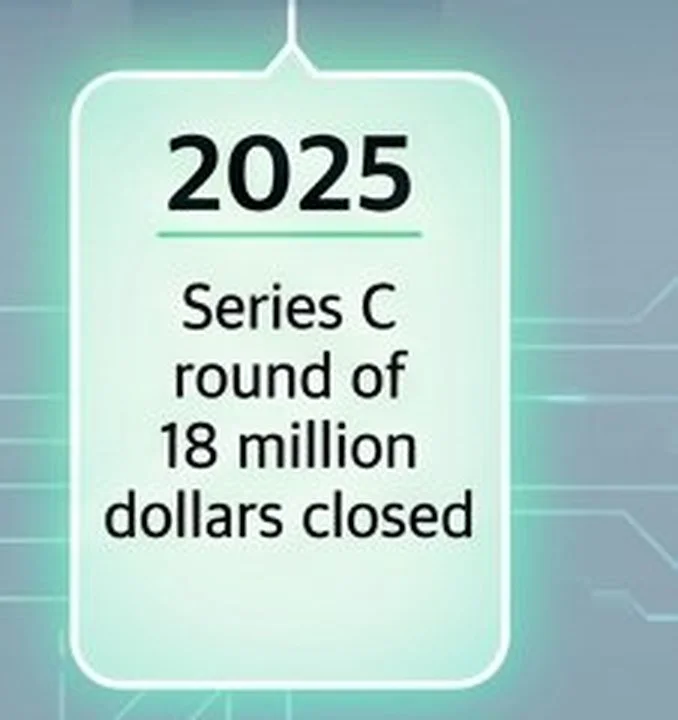
Close-up, 10 events: the 2023 funding round labeled 2025.
The result came back as a picture, and we could not edit its text in place. The free plan allows "2 PNG downloads per account", and the limit does not refresh. Downloads carry no Piktochart logo. Pro costs $15 a month, or $10 a month billed yearly, and still downloads PNG only; PDF and PPT start with the Business plan, according to Piktochart’s help center.
ChatGPT vs Gemini: which draws timeline text correctly
- Correct lines: ChatGPT 26 of 28 (two events missing), Gemini 27 of 28 (one misspelling).
- Duplicates: ChatGPT none; Gemini 4 of 10 events, then 2 of 18.
- Free image size: ChatGPT 2172×724, Gemini 1376×768.
Verdict: count the events on either image. ChatGPT loses them; Gemini repeats them.
Napkin AI vs Gamma: editable infographics from text
- Correct lines: both 28 of 28.
- Side effects: Napkin added its own headlines; Gamma split words at 18 events and exported that card as a picture.
- Free plan: both brand exports; Gamma’s AI infographic feature needs Pro.
Verdict: Napkin for a standalone visual, Gamma when the timeline sits inside a deck.
Which AI infographic generator to pick
- You need to fix a typo yourself: Napkin AI, Gamma or Canva. Their text stays editable, but proofread Canva’s output first.
- The infographic goes into a finished presentation built from your data: Wonderslide. A text fix inside the infographic means regenerating it through chat.
- You have up to 10 short items and want a quick picture: ChatGPT or Gemini. Count the events before you use it.
- You have 15 or more items: split them into two images of 10 or fewer, or use a tool that writes real text boxes.
- You only got a PDF: our free PDF to PPTX converter turns it into a PPTX file.
What this test doesn’t tell you
- One run per tool. Image tools change their output between runs; we kept the first one.
- One format. We tested a timeline with short English lines. Charts, numbers and other languages may come out differently.
- Design wasn’t scored. We counted correct text, duplicates and missing events, not looks.
- Free plans, except Wonderslide. Paid plans may use other models; Gemini’s Nano Banana Pro is one example.
- Piktochart ran two different models for 10 and 18 events.
- Not tested: Venngage, whose interface switched to another language after sign-up with no way back for us; its help center also says free users can’t download designs. Infogram, Visme and Adobe Express were not tested.
- Tools change often. The results describe October 14, 2026.
FAQ
Can ChatGPT make infographics?
Yes. ChatGPT generates infographic images on all plans, including Free, with a limit. In our test it wrote all 10 lines of a 10-event timeline correctly, but at 18 events it left out 2 events. The result is a PNG, so you can’t edit the text directly. Count the items before you use it.
Can Gemini make infographics?
Yes. Free Gemini draws infographics with Nano Banana 2 and downloads them at 1K. In our test its spelling was nearly perfect, 27 of 28 lines, but it drew several events twice, 4 of 10 in the smaller timeline. Google reserves Nano Banana Pro, which it recommends for text and infographics, for paid plans.
Is there a free AI infographic maker?
Yes. Napkin AI, Gamma, Canva, ChatGPT and Gemini all produced a timeline on a free account in our October 2026 test. Limits differ: Napkin brands exports, Gamma keeps its AI infographic feature for Pro, and Piktochart allows only 2 PNG downloads per account. Wonderslide Free gives PDF downloads.
Which AI infographic maker has no watermark?
In our test, free downloads from Canva, ChatGPT, Gemini and Piktochart showed no visible watermark. Gamma adds its badge and Napkin adds its logo on free plans. Gemini can show a visible mark depending on settings and always embeds an invisible SynthID tag.
Can you edit text in an AI-generated infographic?
It depends on how the tool builds it. Napkin, Gamma and Canva create real text boxes you can click and fix. ChatGPT, Gemini and Piktochart’s image models return a picture, so a fix means a new request or an area edit. Wonderslide places the infographic as an image; a text fix regenerates it through chat.
How do you turn text into an infographic with AI?
Text to infographic AI tools work from a pasted list: paste yours and ask for a format, such as a timeline. Ask it to keep every line word for word. Then count the items on the result, read every line against your source, and check years and numbers. In our test, errors appeared mostly in lists longer than 10 items.
Sources
Checked October 7 to 14, 2026:
- Gamma Help Center: AI infographics are Pro only, export badge
- Napkin AI: pricing, watermark on free exports
- Piktochart Support: free account limits, download formats
- Google Gemini Help: image generation and Nano Banana Pro
- OpenAI Help Center: images in ChatGPT
- Our earlier study: which image model can draw an infographic with small text
About the author
Dmitry Shironosov is the co-founder and CEO of Wonderslide. Before Wonderslide, he and his co-founders worked as graphic designers and spent years making client presentations: pitch decks, investor reviews and training materials. The infographic tests on this blog grow out of that work.
Try it on your own data
Upload a PDF, DOCX or PPTX, or describe the deck you need, and get a designed presentation with infographics built from your data in a few minutes. Free plan, no card required.