If you need a finished, editable PowerPoint rather than a web-first deck, Wonderslide is a close Gamma alternative. You describe the task or upload your files and download a PPTX where every shape, text block and image is a separate, editable object. You can pay per deck, per week or per month instead of committing to a yearly plan.
Beautiful.ai suits teams that want strict layouts. Pitch suits collaborative decks. Copilot and Plus AI make sense if you never want to leave PowerPoint. In our test, Gamma’s own PPTX export kept text and tables editable, so switch only for its card-based format, credit limits or the free-export badge.
Key takeaways
- In our test, Gamma turned a 10-slide deck into an editable PPTX: all text stayed editable and the table stayed a real table, but the bar chart and icons became pictures.
- Gamma flagged 4 of the 10 slides as “overflowing content,” and separately, 4 pages of the PDF export came out taller than the standard 16:9 size.
- Generating the deck used 38 of the 400 credits Gamma gives new accounts, and every export on the Free plan carries a “Made by Gamma” badge.
- At least 6 of the 9 alternatives have no permanent free plan with PPTX export, and that includes Wonderslide’s free tier.
- Wonderslide sells decks one at a time as well as by subscription: $4.99 for one deck, $7.99 for a Week Pass or $12.99 for a month. Prices vary by region.
Gamma alternatives compared
Want to try this on your own deck?
| Tool | Best for | Editable PPTX | Upload your own file | Free plan | Paid from |
|---|---|---|---|---|---|
| Wonderslide | Finished decks from a task or your files | Yes, every object editable | PDF, DOCX, PPTX, XLSX | 3 decks/month, PDF only | $4.99 per deck, $7.99/week, $12.99/mo |
| Gamma | Web-style decks, docs and sites | Yes, charts and icons as images | PDF, PPTX | 400 one-time credits, badge on exports | $9/seat/mo billed yearly |
| Beautiful.ai | Teams that want strict layouts | Yes, on paid plans | PowerPoint import | 14-day trial | $14.50/mo billed yearly |
| Pitch | Collaborative team decks | From Plus | PPTX import on all plans | Yes, no PPTX export | €10/mo billed yearly |
| Microsoft Copilot | People who live in PowerPoint | Native PowerPoint | Works with your files | No | $9.99/mo (Microsoft 365 Personal) |
| Plus AI | Google Slides and PowerPoint users | Native file | PDF, DOCX, PPTX | 7-day trial | $10/mo billed yearly |
| Canva | Visual, social-style decks | Yes, as a PowerPoint download | PPTX import | Yes, up to 20 AI uses | $12/mo billed yearly |
| Presentations.ai | Quick AI drafts | Yes, on all plans | Starts from a text prompt | 100 credits/year | $20/mo |
| Decktopus | Sales and founder pitch decks | On paid plans | Starts from a text prompt | Trial credits only | $9.99/mo billed yearly |
| SlidesAI | Simple decks from text | Google Slides, PowerPoint, ChatGPT | Text, on paid plans also documents | Yes | $10/mo |
How we compared
On 2026-09-16, the Wonderslide team compared Gamma and 9 alternatives on PowerPoint export, free plans and pricing, and ran Gamma’s export on a real 10-slide deck.
The same day we generated a 10-slide business review in Gamma on a new account, exported it to PowerPoint and opened it in Google Slides. All 10 slides kept editable text, while the chart and icons on 2 slides were exported as pictures.
The prompt asked for a title slide, an agenda, a big-number slide, a table, a bar chart, a photo slide, three icons, a timeline, a two-column comparison and next steps. We did not edit the result by hand. We then inspected the PPTX file structure on each slide and exported the same deck to PDF.
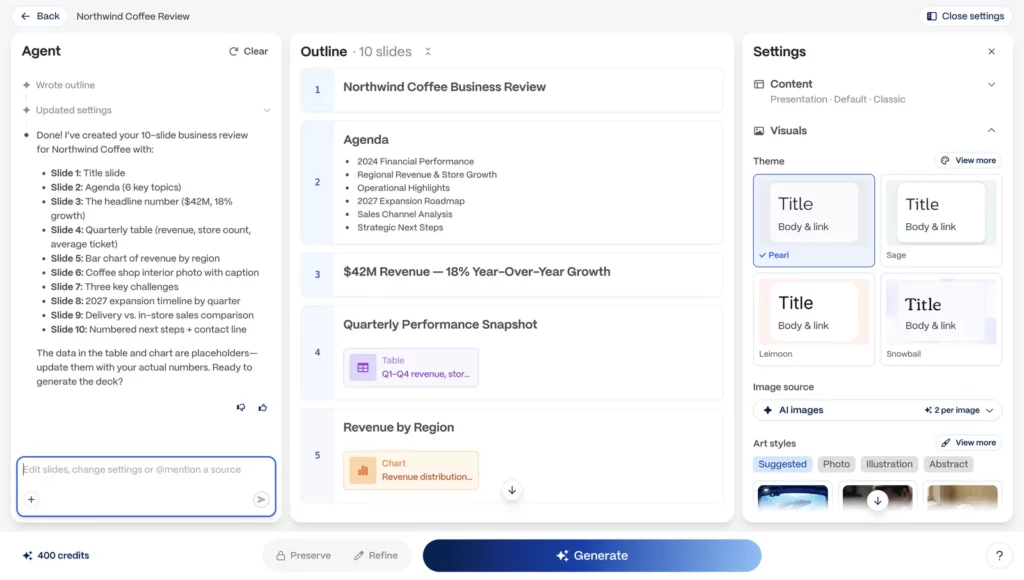
For every alternative we asked the same 4 questions: is there editable PPTX export, on which plan, can you start from your own file, and what does the first paid tier cost.
Gamma: what its PowerPoint export really gives you
What works: Gamma exports to PDF, PNG and PowerPoint, and Google Slides via PPTX upload (Gamma Help). In our file every slide had editable text, and the table came through as a real PowerPoint table.
Gamma says tables “are exported as real, editable tables” by default on all plans, and that it “embeds your theme’s fonts directly into the exported .pptx file.” That way the fonts show correctly even if the viewer does not have them installed.
What does not: the bar chart came through as a picture, and so did the 4 icons on the challenges slide. Before export, Gamma warned that “4 slides have overflowing content” and “layouts may shift after exporting to PowerPoint and Google Slides.” In the PDF, 4 pages came out taller than the standard 16:9 pages.
Gamma also notes that exports “reflect Present Mode, not Edit Mode” (the read-only view you present from, not the version you were editing), and that Google Slides ignores fonts embedded in the PPTX (Gamma Help).
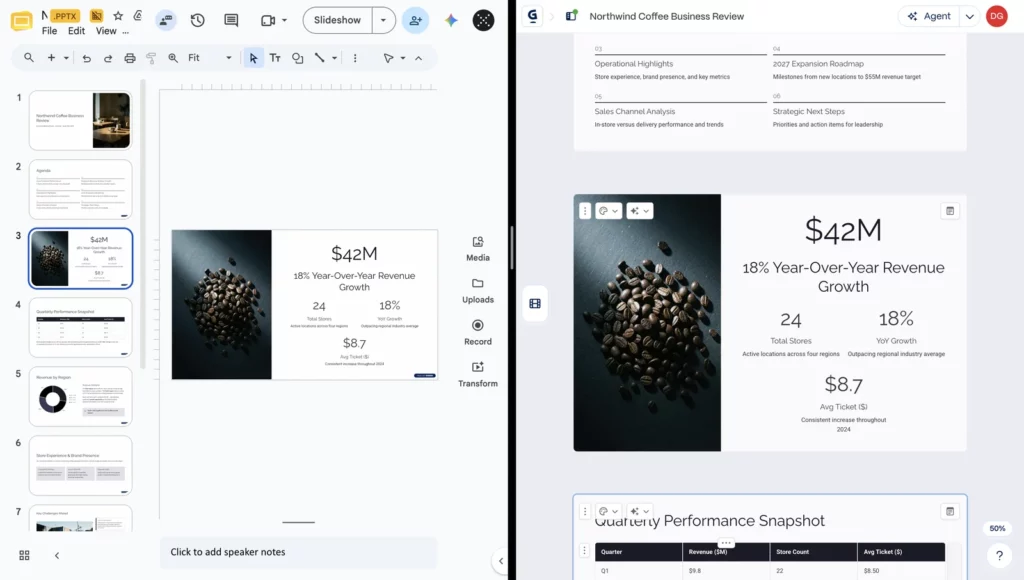
Credits, limits and badge: Gamma runs its AI generation on credits: each new deck or major edit takes a chunk of your balance. The Free plan includes 400 credits at signup that do not refill, and it allows up to 10 slides per prompt. Our 10-slide deck used 38 credits. On the Free plan, “the ‘Made by Gamma’ badge appears on PDF and PPTX exports,” and any paid plan removes it from future exports.
According to Gamma’s pricing page, Plus costs $9 per seat per month billed yearly, with 1,000 monthly credits and up to 100 slides per prompt. Pro costs $18 per month for 4,000 credits, and Ultra costs $90 per month for 20,000 credits, both billed yearly. Annual billing saves up to 28%.
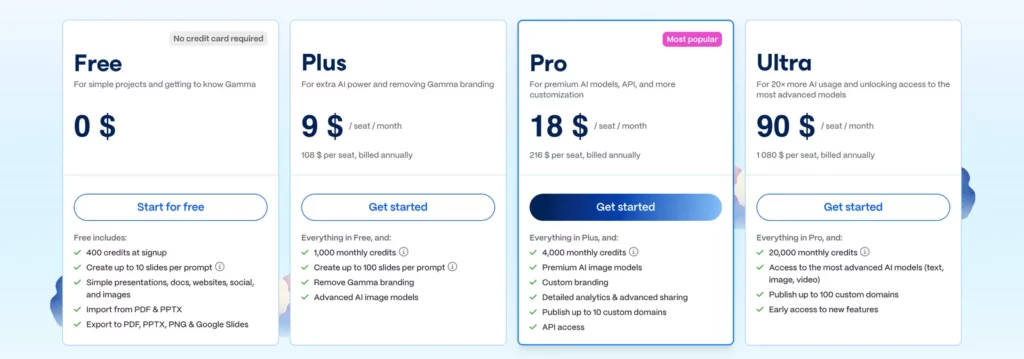
What “card-based” means: each Gamma slide behaves like a scrollable card rather than a fixed page.
Verdict: Gamma’s export is usable. People switch for the card-based format, credit limits, the free-export badge, or a deck built for PowerPoint from the start.
Wonderslide
You describe the task to Wonderslide in plain text and upload your materials if you have them: PDF, DOCX, PPTX, XLSX or other documents, several files at once.
Wonderslide extracts key points and data, can run web research if allowed (every figure comes with a source link and date), and builds a designed deck. You refine it by chatting, for example “make slide 4 a diagram.” A finished presentation is typically ready in a few minutes.
PowerPoint export: every shape, text block and image in the file is an editable object, and the file opens in PowerPoint, Keynote and Google Slides. You can also start from an existing deck: Wonderslide redesign takes a PPTX file and rebuilds the layout, colors and typography while your content stays intact. To turn a PDF, DOCX or other document into a new deck, use document to deck.
Pricing: on Wonderslide’s pricing page, the Free plan gives 3 complete presentations per month, up to 10 slides each, with PDF download and a shareable link. Editable PPTX starts with Single at $4.99 for one presentation, a one-time purchase with no subscription.
Other one-time options are a Pack of 5 for $14.99 and a Week Pass for $7.99, which gives 7 days of access with no recurring charges. Starter costs $12.99 per month and is cheaper with yearly billing. Pro at $24.99 per month removes the monthly presentation limit. Prices vary by region.
Where it falls short: unlike Gamma, PPTX export is not on the Free plan, which is limited to 3 decks a month.
Best for: people who need a finished, editable PowerPoint for work, built from a brief or their own documents.
Beautiful.ai
Beautiful.ai is built around “Smart Slides” that keep layouts aligned as you edit. Its pricing page lists “Editable PowerPoint export” and “PowerPoint import” on paid plans. Pro costs $14.50 per month billed yearly, or $45 for a single month without a yearly commitment. Team costs $40 per month billed yearly for 3 users. There is no free plan, only a 14-day trial.
Best for: teams that want consistent, rule-based slide design.
Pitch
Pitch puts team collaboration first. The Free plan is €0 with unlimited presentations and 100 AI credits that “do not renew once used.” PowerPoint export starts with Plus at €10 per month billed yearly, “with no added Pitch branding.” Team costs €15 and Business €20 per month, both billed yearly. You can import an existing deck as a PPTX on any plan.
Best for: teams that build and present decks together inside one workspace.
Microsoft Copilot in PowerPoint
Copilot creates and edits slides inside PowerPoint itself, so there is no export step. It can build a presentation from a prompt or from your documents (Microsoft Support). Licensing is the limit: Copilot “is not included with the free version of PowerPoint.” For individuals, Microsoft 365 Personal at $9.99 per month includes PowerPoint desktop “with Microsoft Copilot,” and Microsoft 365 Premium at $19.99 per month offers more usage.
Best for: people who already pay for Microsoft 365 and want AI inside their current workflow.
Plus AI
Plus AI “works within PowerPoint and Google Slides” (Plus AI pricing). All paid plans start with a 7-day free trial with 1,000 AI credits. Basic costs $10 per month billed yearly ($15 monthly) and Pro $20 per month billed yearly ($25 monthly). It can also build slides from PDF, DOCX and PPTX files.
Best for: Google Slides and PowerPoint users who do not want a new editor.
More Gamma alternatives to consider
Canva
Canva’s AI presentation features live inside its general design editor. You can download designs as PowerPoint files. The Free plan includes up to 20 AI uses. Pro costs $144 per year for one person ($12 per month) with 10 times more AI, and Business $250 per person per year. It fits visual, social-style decks when your team already designs in Canva.
Presentations.ai
A free Starter plan with 100 credits per year is the entry point at Presentations.ai, followed by Pro at $20 per month and Gold at $50 per month. Its pricing page lists PPTX export on all plans.
Best for: quick AI first drafts.
Decktopus
New users only get trial credits on Decktopus. There is no permanent free plan. Pricing for Pro starts at $9.99 per month billed yearly or $24.99 month to month, with PDF, PPT and PNG export included.
Best for: sales and founder pitch decks.
SlidesAI
Text in, simple deck out: that is SlidesAI. It has a free plan, Pro at $10 per month and Premium at $20.83 per month. It works in Google Slides, PowerPoint, ChatGPT and the web, and building slides from documents comes with the paid plans.
Best for: turning text into a simple deck on a small budget.
A note on Tome
Tome stopped offering presentations and shut down on 2025-04-30 after pivoting to a CRM, according to Forbes. If you see it in older lists of Gamma alternatives, skip it.
Gamma vs Wonderslide: what you get in PowerPoint
- Starting point: Gamma generates from a prompt or an imported file. Wonderslide starts from a task description plus your PDF, DOCX, PPTX or XLSX files.
- Export: both produce editable PPTX files. In Wonderslide every shape, text block and image is a separate object.
- Free plan: Gamma allows PPTX export on Free with a badge. Wonderslide’s Free plan exports PDF only.
- How you pay: Gamma sells credit-based subscriptions from $9 per seat per month billed yearly. Wonderslide lets you buy one deck for $4.99, a Week Pass for $7.99 or a monthly plan at $12.99. Prices vary by region.
Verdict: Gamma fits web-style decks you present from the browser and a yearly subscription. Wonderslide fits when you need a PowerPoint file and want to pay only for the decks or the week you actually need.
Gamma vs Beautiful.ai
- Free access: Gamma gives 400 one-time credits and up to 10 slides per prompt. Beautiful.ai offers a 14-day trial.
- PPTX export: on every Gamma plan. On Beautiful.ai, only with a paid plan.
- Import: both accept PowerPoint files.
- Price: Gamma Plus is $9 per seat per month and Beautiful.ai Pro $14.50 per month, both billed yearly.
Verdict: pick Gamma for a free start and PPTX export on every plan. Pick Beautiful.ai if every slide must follow the same design rules automatically.
Gamma vs Pitch
- Free plan: Gamma exports PPTX on Free with a badge. Pitch Free has no PowerPoint export.
- AI credits: Gamma gives 400 at signup. Pitch Free gives 100, and Plus adds 500 per month.
- Import: both import PPTX on every plan. Gamma also imports PDF.
- Price: Gamma Plus is $9 per seat per month and Pitch Plus €10 per month, both billed yearly.
Verdict: pick Pitch if the deck is a team effort. Pick Gamma if you work alone and want PPTX export on the Free plan.
Gamma vs Canva
- Starting point: Gamma generates a deck from a prompt or an imported PDF or PPTX. Canva’s AI features live inside its general design editor.
- Export: Gamma’s PPTX keeps text and tables as native PowerPoint objects, while charts and icons become pictures. Canva designs can be downloaded as PowerPoint files.
- Free plan: Gamma gives 400 one-time credits; Canva Free includes up to 20 AI uses.
- Price: Gamma Plus is $9 per seat per month billed yearly. Canva Pro is $12 per month billed yearly.
Verdict: stay with Gamma for a deck generated end to end; move to Canva only if your team already builds decks there by hand.
How to export Gamma to PowerPoint
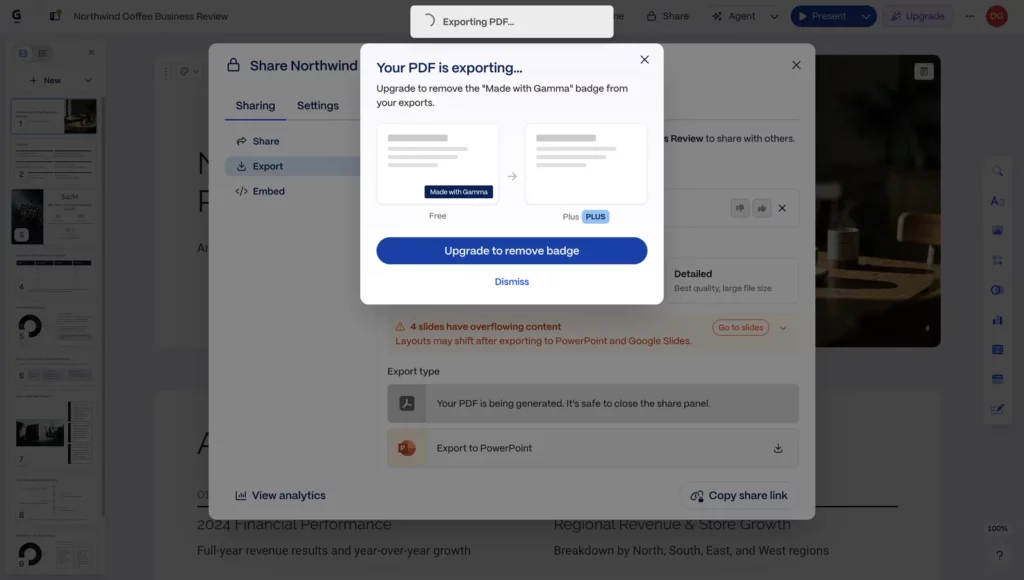
- Open your Gamma deck and click Share, then Export.
- Choose Export to PowerPoint. Leave Editable tables on if you want to edit tables later.
- If Gamma shows an “overflowing content” warning, click Go to slides and shorten those cards first, or the layout may shift.
- Open the file in PowerPoint. In Google Slides, expect fonts to change, because Slides ignores embedded fonts.
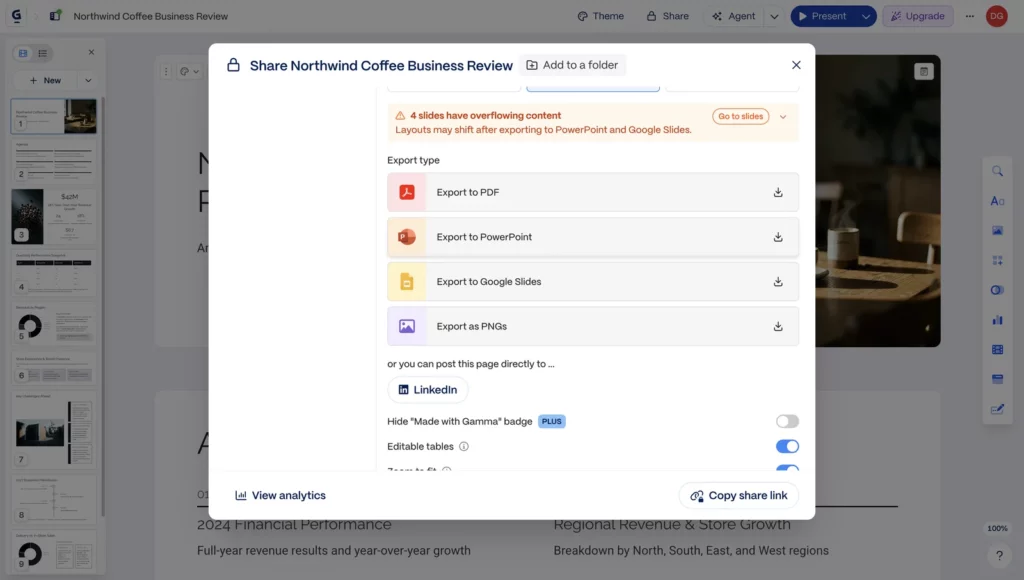
Free plan exports: Gamma adds a “Made by Gamma” badge to PDF and PPTX files exported on the Free plan; exports made on a paid plan come without it.
Need to turn a Gamma PDF back into slides? See our comparison of PDF to PPT converters.
Which one to pick
- If you need an editable PowerPoint built from your brief or files, or just one polished deck without a subscription: Wonderslide ($4.99 for a single deck, $7.99 for a Week Pass).
- If your team wants strict, consistent layouts: Beautiful.ai.
- If you edit decks together in real time: Pitch.
- If you want AI inside PowerPoint or Google Slides: Copilot in PowerPoint or Plus AI.
- If you want web-style decks you present from a link: stay with Gamma.
FAQ
Can I export Gamma to PowerPoint?
Yes. Gamma exports to PPTX on every plan, including Free. In our test, all text stayed editable and the table came through as a real PowerPoint table, while the bar chart and icons became pictures. On the Free plan, every export carries a “Made by Gamma” badge.
Can I export Gamma to Google Slides?
Yes, through a PPTX file. Export the deck to PowerPoint, then upload the file to Google Slides. Expect fonts to change, because Google Slides ignores fonts embedded in PPTX files. If Gamma warns about overflowing content, shorten those cards before export, or the layout may shift.
Do Gamma exports have a watermark?
On the Free plan, yes. Gamma adds a “Made by Gamma” badge to PDF and PPTX exports. Exports made on a paid plan (Plus, Pro or Ultra) come without it, and upgrading removes the badge from future exports. Plus starts at $9 per seat per month billed yearly.
Is there a free Gamma alternative?
Wonderslide’s Free plan gives 3 presentations per month up to 10 slides with PDF download. Pitch has a Free plan without PowerPoint export. Presentations.ai has a free plan with 100 credits per year. For editable PPTX, most tools require a paid plan or a one-time purchase.
What is a good Gamma alternative for PowerPoint?
It depends on where you want to work. For a finished PPTX built from a brief or your documents, try Wonderslide: every shape, text block and image in the file stays editable. For AI inside PowerPoint itself, use Copilot or Plus AI, which also works in Google Slides.
What happened to Tome?
Tome shut down its presentation product on 2025-04-30 and pivoted to a CRM, according to Forbes. Older lists of Gamma alternatives still include it, but there is no longer a presentation product to sign up for.
Build your next deck in Wonderslide
Need a PowerPoint file rather than a web-style deck? Try it on your own deck. Upload a PDF, DOCX or PPTX and get a designed presentation in a few minutes. Free plan, no card required.