Prices last checked September 22, 2026
In 2026 the cost of an AI presentation maker is between $0 and $40 per month, with one-time purchases beginning at $4.99; if you produce one to five decks each month then you can expect to pay between $8 and $20 per month for an entry plan on an annual basis.
There are free plans available, but they have certain restrictions attached to them, such as watermarked exports, credit limits that do not refresh, or locked PowerPoint downloads. At the same time, demand is continuing to increase. Meanwhile, demand keeps growing. Grand View Research values the generative AI content creation market at $26.0 billion in 2026 and projects $80.1 billion by 2030.
In this guide, we break down the pricing of 8 popular AI presentation tools. We’ll show you what each plan actually includes so you can pick the right option for one-off decks, monthly projects, or weekly output.
How Much Does an AI Presentation Maker Cost?
Here’s a short answer, split by the three pricing models you’ll run into:
- Subscription: $8 to $20 per month for an entry plan billed annually. Monthly billing costs more, and team plans reach $40 per user.
- Credits: the plan price stays fixed, but how many decks you get depends on how many credits each AI action uses.
- One-time: from $4.99 for a single presentation, with no recurring charge.
Billing cycle matters as much as the plan. Decktopus Pro is $19.99 per month billed annually and $24.99 billed monthly. Canva Pro is $120 a year, or $10 per month, against $15 month-to-month. The cheapest entry subscription here is Gamma Plus at about $8 per month billed annually, and the cheapest single deck is a $4.99 Wonderslide purchase.
AI Presentation Maker Pricing: 3 Common Pricing Models
Most tools mix two of these models. The model decides how predictable your bill is and what a round of edits really costs.
Subscription Pricing
A subscription is a flat monthly or annual fee for access to the tool. You pay the same whether you make 1 deck or 20, which makes it the easiest model to budget.
Keep in mind that advertised rates usually assume annual billing. Wonderslide Starter, for example, is $12.99 per month, with up to 25% off on annual billing. Presentations.ai shows only annual pricing: Pro is $20 per month, billed as $240 a year.
Best for: regular deck production, where per-deck costs stop mattering.
Credit-Based Pricing
Imagine that credits are similar to in-app tokens. You use them to carry out individual AI tasks, for example drafting slides, rewriting copy, or producing custom images. The amount you pay for your subscription remains constant, but your balance decreases each time you make a click.
Gamma, Canva, Decktopus, Pitch, Plus AI and Presentations.ai all count AI usage in credits or allowances rather than in finished presentations. This is where budgets break, for two reasons.
First, every action draws from the same pool. On Gamma’s free plan, every AI action uses credits, and the cost varies with the model and the length of the generation. Heavy editing drains an allowance faster than creating new decks.
Second, the number of credits isn’t equal to the number of decks. Gamma’s free plan starts with 400 one-time credits, and how many decks they cover depends on length, images and edits. Plus AI states that a task typically uses 40 to 170 credits, depending on complexity.
Rollover decides whether a quiet month is wasted money. Gamma lets unused paid credits roll over up to double the plan size. On paid Gamma plans, standard presentations and images are included and credits go to premium features, so “unlimited” can mean unlimited for one kind of work only.
Where it falls short: if you iterate a lot, credit pricing is the least predictable option.
One-Time Payment: AI Presentation Makers With No Subscription
A one-time purchase pays for a single project with no recurring charge. It’s perfect for the one deck for a pitch, a conference talk or a thesis defense.
Among the eight tools here, only Wonderslide sells one-time purchases: a single presentation for $4.99, a Pack of 5 for $14.99, or a Week Pass for $7.99 with 7 days of access. No subscription and no recurring charges. Prices vary by region.
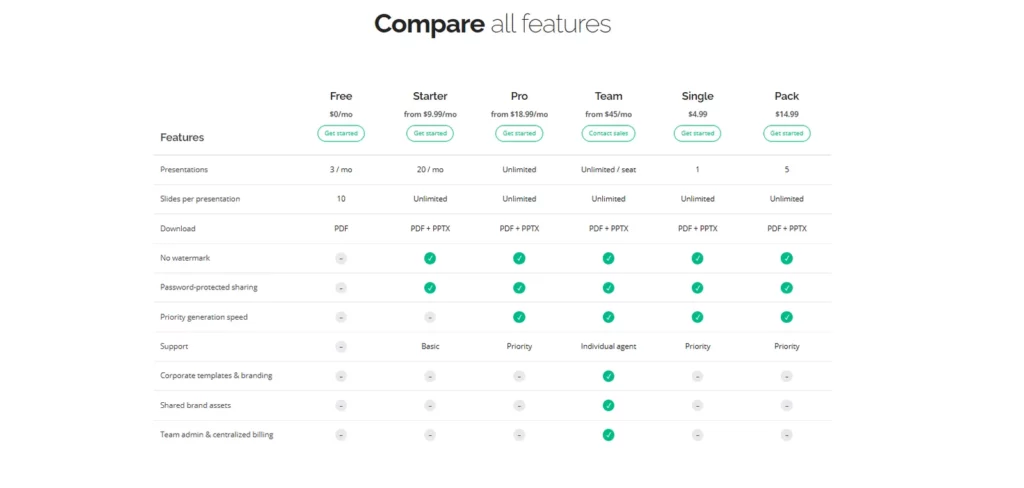
Which option fits which workload:
- One deck: a Single at $4.99.
- Several decks in one short burst, such as a defense week or a pitch sprint: a Week Pass at $7.99 for 7 days of access.
- A few decks spread over several months: a Pack of 5 at $14.99, about $3 per deck.
- 3 or more decks every month: Starter at $12.99 includes 20 presentations. Three Singles already cost $14.97.
For pitch decks specifically, it also helps to compare AI tools built for pitch decks before you pay for anything.
AI Presentation Maker Pricing Comparison
| Tool | Price per month | Annual (per month) | Free plan and its limits | Watermark on free plan | PPTX export | One-time purchase | Last checked |
|---|---|---|---|---|---|---|---|
| Beautiful.ai | $45 (Pro) | $14.50 (Pro) | No. 14-day trial | n/a (no free plan) | Yes, on paid plans | No. The $45 one-off option is Pro billed monthly | Sep 22, 2026 |
| Canva | $15 (Pro) | $10 ($120/yr) | Yes. Up to 20 Standard or Premium AI uses per month | Only on premium elements | Yes, including free | No | Sep 22, 2026 |
| Decktopus | $24.99 (Pro) | $19.99 (Pro) | Yes. 15 free credits | Yes (Decktopus logo on exports) | Pro and above | No | Sep 22, 2026 |
| Gamma | $10 (Plus) | ~$8 (Plus) | Yes. 400 one-time credits | Yes (“Made with Gamma” badge) | Plus and above | No | Sep 22, 2026 |
| Pitch | $12 (Plus) | $10 (Plus) | Yes. Unlimited presentations, 100 AI credits | Yes (Pitch logo on exports) | Plus and above | No | Sep 22, 2026 |
| Plus AI | $15 (Basic) | $10 (Basic) | No. 7-day free trial | n/a (no free plan) | Yes, works inside Google Slides and PowerPoint | No | Sep 22, 2026 |
| Presentations.ai | Annual billing only | $20 (Pro, $240/yr) | No. 7-day free trial with 200 credits | No branding on shared links | Listed on all plans; Pro adds high-quality export | No | Sep 22, 2026 |
| Wonderslide | $12.99 (Starter), $24.99 (Pro) | Starter: up to 25% off | Yes. 3 complete presentations per month, up to 10 slides, PDF only, non-commercial license | No | On paid plans and one-time purchases | Yes. $4.99 single, $14.99 for 5, $7.99 Week Pass | Sep 22, 2026 |
Read the PPTX export and one-time purchase columns first. Those are the two choices that most often force an upgrade you didn’t plan for.
What Free AI Presentation Makers Actually Include
A free AI presentation maker usually works like an extended trial. You can create decks, but exports are often restricted and credits usually don’t renew. Three of the eight tools here have no free plan at all.
Three questions show whether a free plan is enough.
Is There a Free AI Presentation Maker Without a Watermark?
Yes, but only a few. Most tools brand free output:
- Gamma adds a “Made with Gamma” badge to shared and exported content until you upgrade to Plus.
- Pitch puts a small Pitch logo on exported files on its free plan.
- Decktopus lists removing its logo from exports as a Pro feature.
- Beautiful.ai, Plus AI and Presentations.ai have no free plan, only trials.
Wonderslide’s free plan has no watermarks.
How Many Presentations Do You Get on a Free Plan?
It depends on whether the allowance refreshes.
Refreshing monthly allowances:
- Wonderslide: 3 complete presentations per month, not previews, up to 10 slides each
- Canva: up to 20 Standard or Premium AI uses per month
One-time allowances that never refresh:
- Gamma: 400 credits at signup, which don’t refresh
- Pitch: 100 AI credits, with unlimited presentations
- Decktopus: 15 free credits
Trials only: Beautiful.ai offers a 14-day trial, Plus AI a 7-day free trial, and Presentations.ai a 7-day trial with 200 credits.
Slide caps matter as much as deck counts. According to Wonderslide usage data, September 2026, a typical paid presentation runs 8 to 19 slides, so a 10-slide ceiling cuts off real work.
Free AI PPT Maker: Is PPTX Export Included?
Rarely on a free plan. Gamma, Pitch and Decktopus all put PowerPoint export on their paid tiers, and Wonderslide downloads PDF for free, with editable PPTX on any paid plan or one-time purchase. Beautiful.ai, Plus AI and Presentations.ai have no free plan at all, so export starts with a trial or a paid plan.
If you start from a PDF rather than a prompt, there is one free route. Wonderslide’s free PDF to PowerPoint converter turns an existing PDF into a PPTX with editable text, with no sign-up, for files up to 50 MB and 100 pages. It converts a file you already have and does not generate a new deck, so the paid PPTX export above still applies to presentations made by the AI.
File access and file quality are separate questions. An exported PPTX can arrive with shifted objects or flattened, non-editable elements, which adds cleanup time. If you switch formats often, read up on how PPTX and PDF differ in practice. In Wonderslide, you edit the result in chat, and an online slide editor is rolling out.
Hidden Costs of AI Presentation Makers
The advertised price is rarely the full story. Watch out for these four unexpected costs after signing up:
Watermarks and Branding
On a free plan, branding lands on the finished file, so a client deck carries someone else’s logo. Removing it costs $8 to $20 per month on an entry annual plan. For internal decks, a free tier is usually enough.
PPTX and Other Export Costs
Export gates cost money, and cleanup costs time. As a rule of thumb, if a deck needs more than about 15 minutes of fixing after export, a dedicated tool at $8 to $20 per month pays for itself.
Credits for Images and AI Generation
Images and text often drain the exact same credit pool. Canva’s Standard and Premium AI tools share one monthly allowance, and on Gamma’s free plan, AI images come out of the same one-time pool as deck generation. A few hero images can empty an allowance.
Wonderslide takes a different approach: infographics built with ChatGPT Image 2.0 are included on every plan.
Team Seats and Other Extra Costs
Adding one collaborator can change the math. Beautiful.ai Team costs $40 per user per month billed annually, or $50 billed monthly. Pitch Team is $19 per seat per month billed yearly, against $10 for Plus. Wonderslide team plans are available on request.
Three more costs rarely appear on a pricing page:
- Thin or no refund windows. Since December 1, 2025, Gamma refunds only within 3 days of subscribing, and only if credit usage stays under a plan threshold. Beautiful.ai offers a partial refund on annual plans within 24 hours, and monthly plans are non-refundable. Decktopus doesn’t refund monthly or annual subscriptions.
- Early cancellation deadlines. Gamma asks you to cancel at least 30 days before renewal.
- Tax. Listed prices usually exclude tax, as Pitch notes on its pricing page, so EU buyers pay VAT on top.
How to Choose the Best AI Presentation Maker by Usage
Pick a plan type by how often you present, not by brand.
Making One Presentation Every Few Months
Skip the subscription. For occasional use a one-off purchase or the free plan is sufficient. If you already use ChatGPT, you can also draft the deck there first and design it afterward.
Another option: take an entry plan for one month and cancel right after. Check the refund and cancellation terms first, and export your files before the plan ends.
Best for: thesis defenses, a single conference talk, one client pitch.
Making Several Presentations a Month
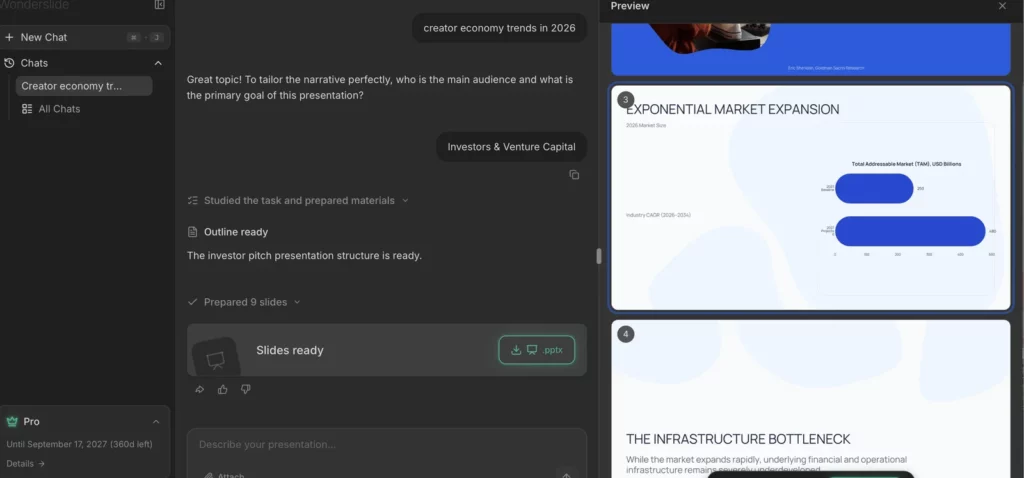
An entry subscription billed annually, at $8 to $20 per month, fits this case best. It covers branding removal, PPTX export and enough credits or decks for normal work. Wonderslide usage data from September 2026 shows that on average a presentation is created in about two minutes on the service.
Check your existing subscriptions first. An office or design suite may already include AI slide generation. A dedicated tool makes sense when you need cleaner PowerPoint output or a workflow the suite handles poorly, such as turning a long document into a deck.
Best for: steady output without counting credits before every deck.
Making Presentations Every Week
At 4 or more decks a month, choose an unlimited tier or a large credit pool. At this volume, cleanup time matters more than the per-deck price. If most of your decks start from reports or spreadsheets, a document-to-deck workflow saves the most. Wonderslide also eliminates the need to pick a model since it chooses the appropriate AI engine for each step.
The recommendation changes when about five decks are dealt each month or when one teammate is added. In those cases, the price should be re-evaluated on a per-seat basis.
Frequently Asked Questions About AI Presentation Maker Pricing
Can I Pay Once Instead of a Subscription?
Yes, but among the eight tools compared here, only Wonderslide sells one-time purchases: $4.99 for one presentation, $14.99 for five, or $7.99 for a 7-day Week Pass, with no recurring charges.
Gamma App Pricing: What Does Gamma Cost per Month?
Gamma Plus costs about $10 per month billed monthly, or about $8 per month billed annually, and removes the “Made with Gamma” badge. On paid plans, standard presentations and images are included, and credits cover premium features. The free plan gives 400 one-time credits that don’t refresh.
Beautiful.ai Pricing: Is It Worth the Price?
It depends on your billing cycle. Pro costs $14.50 per month billed annually or $45 billed monthly and includes unlimited AI content generation and editable PowerPoint export. There’s no free plan, only a 14-day trial. Refunds are partial and only on annual plans within 24 hours.
Which AI Presentation Maker Is Cheapest for Students?
Start with what your school already provides. Beautiful.ai offers a year free for students with a valid .edu email, and Pitch’s free plan allows unlimited presentations with 100 AI credits. For a single defense deck, a $4.99 one-time Wonderslide purchase often costs less than a month of any subscription.
What Are Credits in AI Presentation Apps?
Credits are an internal currency you spend on individual AI actions: generating slides, rewriting text or creating images. They aren’t deck counts. Plus AI says a task typically uses 40 to 170 credits, and Gamma’s cost varies with the model and length, so edits and images shrink an allowance fast.
Do AI Presentation Tools Charge for PPTX Export?
Often, yes. Gamma, Pitch and Decktopus put PowerPoint export on paid plans, and Wonderslide includes editable PPTX with any paid plan or one-time purchase. Presentations.ai lists export on all plans. Beautiful.ai and Plus AI have no free plan at all.
How We Compared AI Presentation Maker Pricing
We checked each of the 8 tools on September 22, 2026, on the vendor’s own pricing page, linked from the tool name in the table. For refunds, credits and branding, we used the vendors’ own help centers, also linked in the text. Every figure here comes from the vendor itself, and anything we could not confirm on a vendor page was left out.
What we recorded for each tool:
- monthly price, annual price per month, and total annual charge
- whether the price is per seat, and the seat minimum
- free-plan limits, and whether free credits refresh
- branding on free output
- which tier unlocks PPTX export
- one-time purchase options and the refund window
Currency and region. All figures are US list prices in USD. Most vendors add tax at checkout, and several localize prices by region.
What this comparison doesn’t do. We didn’t run a design or output-quality test. For quality, try the free tier or trial of any tool on your own material before paying.
Disclosure. This comparison is published by Wonderslide, one of the tools listed.
Choose the AI Presentation Maker That Fits Your Budget
The sticker price rarely determines the actual amount you have to pay. What you really pay depends on whether credits refresh, whether your file format is included, and how much cleanup the export leaves behind. A plan that provides a clean and editable PPTX is in fact cheaper than a free plan which requires you to rebuild each slide.
Start free, and pay only when a specific wall appears: branding on a client deck, a missing PPTX export, or exhausted one-time credits.
5 questions to ask before paying:
- How many presentations did I make in the last 3 months?
- Does a subscription I already pay for include AI slide generation?
- Do I need a PDF or an editable PPTX at the end?
- Are my decks spread across months, or packed into one busy week?
- What are the refund and cancellation terms, and when does the trial convert?
Try it on your own deck. Upload a PDF, DOCX or PPTX and get a designed presentation in a few minutes. Free plan, no card required.